

SANXO – Scope MET20: Metallurgical microscope
The SANXO-Scope MET20 is the digital inspection and measuring station for metallurgy industry. The microscope model is equipped with the new 20 Mpix IDS-Imaging camera that gives outstandingly good true colors and it has nearly 90% quantum efficiency.
SANXO – Scope MET20: Metallurgical microscope - Basic Features
The digital microscope product brought into the market by SANXO offers a complete setup for magnified high frame rate live image inspection. The microscope model is equipped with the new 20 Mpix IDS-Imaging camera that gives outstandingly good true colors and it has nearly 90% quantum efficiency.
- High magnification
- Co-axial dimmable light source
- XY table
- Digital Zoom
- Measurement functions
The microscope has been designed with care about the users’ health and requirements. It has adjustable holders for the camera as most standard microscopes have got. The 22” monitor can be tilted to get the best view angle for the user. The application offers basic functionality such as true digital zoom (with no quality loss) and image panning, real-time image enhancement and image saving (local image folder/remote USB memory stick device).
For the laboratory microscopes the manual focusing using the fine knob on the microscope stand gives an ability to adjust the focal point very precisely.
The break of the adjusting mechanism enables an easy change for the samples. The user can easily lift up the microscope head to get enough space for changing the sample. The head will slowly move downward to the same position, so the user do not need to adjust the height again.
 Fast and efficient ZOOM: The camera stand allows the user to use different working distance very easily by moving the camera closer or further to the objects. If the object distance is fixed then the user still can use the real-digital zoom by rolling the mouse wheel. Using the digital zoom the image is equally very sharp and clear on the full HD resolution LCD.
Use the mouse wheel to switch between the zooming profiles. The zoomed area will always be centered to the current position of the mouse pointer. This means the user can zoom any part of the viewed area unlike the motorized optical zoom, which zoom only in the middle of the image. As an extra an overlay graphic on the top right corner provides information on the current size and location of the zoom state.
XY-table: The microscope stand has got a fine tunable XY table, that help to move the sample under the microscope lens
Co-axial light source: The microscope uses LED Co-axial light, that is dimmable.
Converter lens (TM2X): By using the converter lens, a double magnification can be achieved with the same camera and optics.
Panning
If the currently active profile only shows a section of the camera sensor's image, then the currently shown part becomes movable. Again, an overlay on the top right corner of the screen gives the user feedback on the current state of the pan.
Dimensions


Materials
The microscope comes with a robust stainless steel, adjustable camera stand with a fine movable XY table and a dimmable co-axial light. The LCD contains the mini PC attached in its back. The rest of the parts of the system are EC complied standard products.
Video recording
The SANXO industrial digital microscope provides video recording. The resolution and the frame rate can be adjusted in the settings. To start or stop the video recording, simply click the appropriate icon in the right-click menu.
HDR
The SANXO industrial digital microscope offers the High Dynamic Range Imaging function.
This function highlights the details in the darker part of the image (typically if the details are in the shade) or reduces the shiny saturated bright part of the image.
Setups and SANXO – Scope MET20: Metallurgical microscope Prices
Models | Sanxo-Scope MET20 |
|---|---|
Item no: | SC-17-01-11 |
Camera | IDS Imaging 20 MPixel color camera c.a 4x digital zoom |
Lens | Japanese model + optional telecentric microscope lens: TM2X (the magnification can be doubled) |
Monitor | Full HD resolution 24” |
Camera stand | Robust and adjustable camera stand |
PC | INTEL NUC i5® 8GB RAM, 120GB SSD |
Focus | Manual focus |
Magnification | c.a: 600x-1600x |
Light source | Dimmable Co-axial light |
Frame rate | c.a.30-70 FPS |
Measurements

Distance
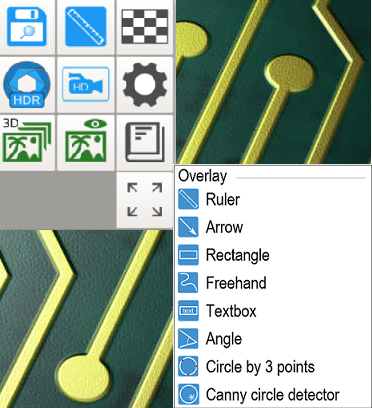
With the Ruler function, users can measure 2D distances between two - manually marked - points. The measurement's dimension is pixels or mm unit- after calibration.
Angle
With the SANXO-Scope HD you can measure angles. The user has to mark the 3 points manually. The measurement unit is degree.
Circle
For measuring circles, the user has two options: a manual and automatic method. With the manual method (Circle by 3 points) the user marks the 3 points, which defines the circle. With the automatic method (Canny circle detector) the user marks only a rectangle area around the circle. The dimensions are in pixels or after calibration in mm units.
DTM Code reading
If the product has identification code / QR code, DTM matrix, Barcode / then the user can use the DTM tool to read it and save the image with a name that includes time stamp and identification code.
Coordinate system
Coordinate system helps the user to make a quick check of the dimensions of the inspected object. Horizontal, vertical or a complete coordinate system can be placed in the image. The microscope system can start with the coordinate system in the optical center (like a crosshair).
2D Calibration
Using the calibration feature, distance between two points displayed on the screen can be measured using either pixel units or calibrated real-world units. The calibration process can be performed using the calibration card provided with the SANXO-Scope HD. The calibration can be initiated by opening the toolbar menu and clicking on the Calibration icon.
The measured distance is given either in pixels ('px') on the sensor or, if a calibration is present, in the chosen real-world units ('mm' by default). You may switch between the measurement modes through the toolbar menu by clicking the 'mm/px' toggle button. The corresponding menu elements can be seen on the right.
One-Click calibration
 The SANXO-Scope MET20 can easily be calibrated using a calibration glass. The calibration only takes a few seconds and after that the scope can be used to measure distances accurately in real-world units.
Overlay Graphics
The SANXO-Scope HD provides overlay graphics that can highlight and/or measure certain features for documentation. For highlighting the user can use an Arrow, Rectangle, Freehand and Text box. The user can measure circles, distances and angles. The positions of the overlay graphics will not change if the user zooms in or zooms out.
Advanced Features
HDR
With the SANXO-Scope HD, applying HDR (High Dynamic Range) techniques, high dynamic range light conditions that are problematic even for the human eye, can be easily managed. During the process an image sequence is captured, applying varying exposure times. Based on the sequence the camera response can be estimated, and a pixelwise floating point representation can be created.
FAQ
1. How can I order SANXO-Scope?
Contact your local distributor or SANXO main office at sales@sanxo.eu
2. How can I try out SANXO-Scope?
Contact your local distributor or SANXO main office in Budapest, where there is a test equipment you can try out.
3. Delivery time of SANXO-Scope
The delivery time is usually 4 weeks after receiving order.
4. Packaging
SANXO tries to use as little plastic and as many recycled materials as possible when packaging. The new packaging is designed to provide extra protection for the microscope and make unpacking more convenient. The standard dimensions of the cardboard box used are: 610x440x340mm.
5. How to set up my system after receiving the package?
Please download the Assembly manual and follow its instructions.
6. Troubleshooting my system
Please download the User manual and try to find the solution for your problem. In case you are still not able to troubleshoot your system, please contact us at info@sanxo.eu
METALLURGICAL
microscope
PCB
microscope
CO-EXTRUSION
microscope
LAB
microscope
Contact
Get In Touch